Increase your productivity via macOS, iPadOS and iOS automations
Add/Remove Group membership Names to Contacts notes.
Get link
Facebook
X
Pinterest
Email
Other Apps
This Applescript identifies which Group(s) a Contact is listed in and adds the details to Contacts notes. It also allows for the removal of duplicate note entries.
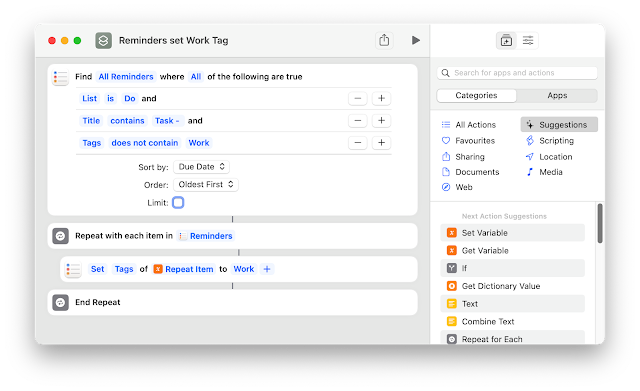
Wanting to keep track of work tasks and not wanting to use the employer supplied task manager (Outlook) I created the following workflow to create a Reminders item and Trello Card from an email I send to my personal email account. Here are the steps that you need to follow to replicate this workflow. 1. Modify the Applescript Configuration to suit your needs, eg Trello email etc The Applescript needs to be saved in the following location /Users/(User Name)/Library/Application Scripts/com.apple.mail I use the method of using a standard Applescript rather than one designed specifically for Mail Rules as I find the Mail Rules version does not run reliably. 2. If you want to use Reminders Tags, create a Shortcut as follows 3. Create a Rule to trigger the Applescript if a Mail message is received using your nominated Task Tag, *** in my case. 4. Create an email and prepend *** to the Subject. If you want to set a due date beyond today, just add a number ...
Now that Shortcuts is available on the Mac as well as iOS devices, I am slowly switching, where possible, my workflows over to Shortcuts , making them cross-platform. This Shortcut duplicates most of my Obsidian Daily Journal workflow that predominately relied on Applescript, making it unusable on my iPhone and iPad. The output for pasting into my Obsidian daily note will list all of today's Calendar events and the open Reminder tasks. There are links to the apps that can be used on all devices. If the routine is run on my Mac (which I typically do each morning), it will send the details of the Calendar events and Reminder tasks as an email to my work address. The Shortcut can be downloaded here. Hope it gives you some ideas on automating a similar process to suit your needs.
There are many web host providers that offer a low initial cost as an incentive to use their services. Ultimately their charges will rise after the introductory period expires. For just the cost of the annual domain registration fee, you can create simple websites using Google Domains and Google Sites and/or Blogger. You will need to register for a Google account to use this approach. Google’s domain name prices are in line with the industry standard, but its Domain Management interface is much nicer than most of its competitors. Check for the availability of your name on Google Domain, Sites and Blogger before buying the domain. A tip is to create the site or blog with the name that relates to your Domain. This will allow 2 ways to access your site, eg widgets.com or widgets.blogspot.com. 1. Start by buying the Domain name of your choice. 2. log in to Google Sites and create your site. You don’t need to finish the design at this stage. If you only want to blog, you can instead go...



Comments
Post a Comment