
Posts

Showing posts with the label Applescript

Apple Mail Rule Updater

Image
Apple Mail has the best Rules function compared to 3rd Party apps, but updating them is cumbersome. I have created the Applescript below that makes it easy to update Rules by adding one of the following parameters based on the selected Mail message(s) Email address Domain name Subject keyword Message content keyword In this example, I received a Twitter email regarding a post by Federico Viticci. I selected the message and invoked my Email Conflict Palette and chose option 7 I am then prompted to select the Rule to update and the Rule type to use. In this example  I ran each option, using "Gruber" as the keyword.  Note the Rule needs to exist first; you can create it using a dummy rule to get started. Here is the Rule after processing the email message. ZZZZ was the dummy entry. I find that I can process most of my Mail automatically with the use of Rules and this update routine makes the maintenance of the Rules system so much easier. I hope you find this approach of use; a...
Mail message to Reminders Item and Trello Card

Image
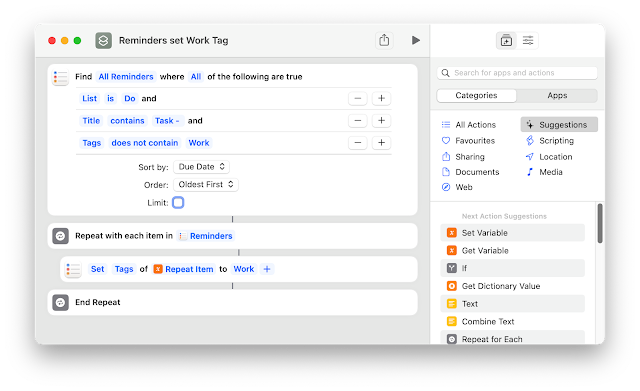
 Wanting to keep track of work tasks and not wanting to use the employer supplied task manager (Outlook) I created the following workflow to create a Reminders item and Trello Card from an email I send to my personal email account.  Here are the steps that you need to follow to replicate this workflow. 1. Modify the Applescript Configuration to suit your needs, eg Trello email etc The Applescript needs to be saved in the following location /Users/(User Name)/Library/Application Scripts/com.apple.mail  I use the method of using a standard Applescript rather than one designed specifically for Mail Rules as I find the Mail Rules version does not run reliably.  2. If you want to use Reminders Tags, create a Shortcut as follows 3.  Create a Rule to trigger the Applescript if a Mail message is received using your nominated Task Tag, *** in my case.  4. Create an email and prepend *** to the Subject. If you want to set a due date beyond today, just add a number ...

Record software licences in Numbers

Image
I am partway through my exodus from 1Password, brought on by their change to a cloud-based subscription service.  One of the features of 1Password I used was the recording of Software Licence details. I decided to create a process whereby I can record the details of software licenses in Numbers, automating as much as possible the extraction of details from the emails I receive on making software purchases. Generally, software licenses are granted using the name of the purchaser and an email address. This workflow will extract the Date (typically this will be the purchase date), Recipient Name (or default name if not found), Recipient Email address, and a link to the email message and then create a new record in the Numbers document. The email message will be tagged via MailTags ( Purchases in my case) and then moved to a folder for archiving. The Mail window will switch to the folder used to archive the messages. Mail and Numbers will then be displayed in a split-screen via a Shor...

Create Markdown list from RSS feed

I was asked if it was possible to get RSS feeds for use in Keyboard Maestro Obsidian Journal macro without relying on DEVONthink.  I created the following code that does the job entirely in Applescript. The list created is in Markdown format but there is also an option to create a HTML version.

Find first URL Link on Webpage that matches search input

Image
This AppleScript will search for a keyword in the URL links on a webpage and open the site. You could use this process to assist in regular web scraping or archiving of content. A tip is to inspect the hyperlink element to see how the link is described as it can be entirely different from the webpage description.

Add/Remove Group membership Names to Contacts notes.

This Applescript identifies which Group(s) a Contact is listed in and adds the details to Contacts notes. It also allows for the removal of duplicate note entries.

Time Block Things 3 tasks in Calendar

To followup my post on time blocking Reminder tasks this version does the same for Things 3 tasks

Time Block Reminders tasks in Calendar

To assist in the completion of tasks I find that by making a Time Block in my Calendar to focus on the issue makes it more likely I will actually complete the task 😀. This Applescript will enable you to select a Reminder due Today, This Week or All then create an Event in Apple Calendar

Keyboard Maestro Daily Obsidian Journal Template

I recently moved my Daily Journal process from DEVONthink 3 to Obsidian . Through a combination of Applescript and Shell commands I have automated the creation of the Journal via a Keyboard Maestro macro. Along with some standard Categories such as Weather (via wttr.in ), Daily Quotes and News Headlines (via DEVONthink RSS feeds) I wanted to add in Today’s Events from Calendar and due tasks from Reminders. Unfortunately the process to extract Calendar Events via Applescript is notoriously slow. Luckily by using icalBuddy via a Shell script this process is much quicker. The icalBuddy approach does not allow for a direct link to the Calendar Event but I included a link to the App for both the Mac and iOS version. Getting Reminders Tasks can also be slow but this process can be improved if you regularly delete completed tasks. The Applescript I use creates an entry in Obsidian listing the Reminders List and Task Name with a direct link to the Task that works on both platforms. As ...