
Posts

Showing posts with the label Shortcuts

Mail message to Reminders Item and Trello Card
Image
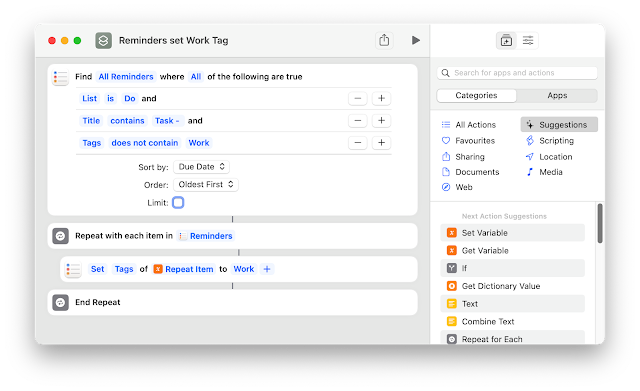
 Wanting to keep track of work tasks and not wanting to use the employer supplied task manager (Outlook) I created the following workflow to create a Reminders item and Trello Card from an email I send to my personal email account.  Here are the steps that you need to follow to replicate this workflow. 1. Modify the Applescript Configuration to suit your needs, eg Trello email etc The Applescript needs to be saved in the following location /Users/(User Name)/Library/Application Scripts/com.apple.mail  I use the method of using a standard Applescript rather than one designed specifically for Mail Rules as I find the Mail Rules version does not run reliably.  2. If you want to use Reminders Tags, create a Shortcut as follows 3.  Create a Rule to trigger the Applescript if a Mail message is received using your nominated Task Tag, *** in my case.  4. Create an email and prepend *** to the Subject. If you want to set a due date beyond today, just add a number ...

Obsidian Daily Digest Shortcut

Image
Now that Shortcuts is available on the Mac as well as iOS devices, I am slowly switching, where possible, my workflows over to Shortcuts , making them cross-platform.   This Shortcut duplicates most of my Obsidian Daily Journal workflow that predominately relied on Applescript, making it unusable on my iPhone and iPad.   The output for pasting into my Obsidian daily note will list all of today's Calendar events and the open Reminder tasks. There are links to the apps that can be used on all devices.   If the routine is run on my Mac (which I typically do each morning), it will send the details of the Calendar events and Reminder tasks as an email to my work address.  The Shortcut can be downloaded here.  Hope it gives you some ideas on automating a similar process to suit your needs.

Record software licences in Numbers

Image
I am partway through my exodus from 1Password, brought on by their change to a cloud-based subscription service.  One of the features of 1Password I used was the recording of Software Licence details. I decided to create a process whereby I can record the details of software licenses in Numbers, automating as much as possible the extraction of details from the emails I receive on making software purchases. Generally, software licenses are granted using the name of the purchaser and an email address. This workflow will extract the Date (typically this will be the purchase date), Recipient Name (or default name if not found), Recipient Email address, and a link to the email message and then create a new record in the Numbers document. The email message will be tagged via MailTags ( Purchases in my case) and then moved to a folder for archiving. The Mail window will switch to the folder used to archive the messages. Mail and Numbers will then be displayed in a split-screen via a Shor...